

The Best Data Cleansing Software: A Comprehensive Guide

Data cleansing, or wrangling, is an essential practice to keep a set of information accurate, up-to-date, and free from redundancies. Accuracy, completeness, consistency, validity, and uniqueness are the metrics that can help in understanding the reasons plaguing data with dupes, inaccuracies, and inconsistencies.
For sure, cleansing data is a pricey practice. Companies pay out hefty amounts to wrangle, standardise, and enrich datasets. Certified data scientists and cleansing experts are highly paid resources. So, people think of its alternatives, which are none other than cleansing tools.
So, here we’ve come with some of the best data cleansing software that can provide high-quality data within a few minutes without the need for specialists or experts.
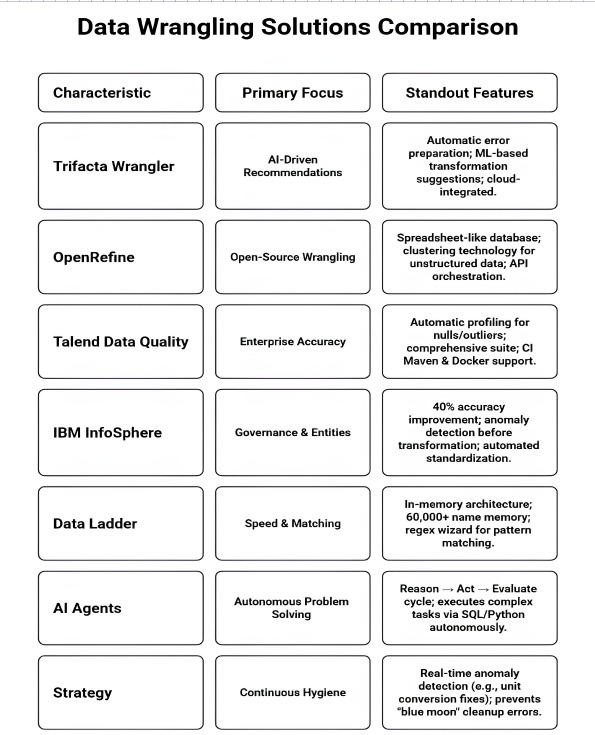
The Best Data-Cleaning Software
In the list, you will find everything about the standout cleansing software, its features, and its benefits.
Trifacta Wrangler: Best for AI-Driven Recommendations
A survey by Dresner Advisory Services revealed that 63% of users find it essential to adopt tools like Trifacta for enhanced data quality and efficient analysis.
This data cleansing software is capable of automatically preparing data to remove errors like duplicates, incomplete data, uneven formats, etc. This tool is actually a desktop application that can transform data from a specific process, like a network, cloud, or service provider. Once cleansed, all records are visualised in graphs or charts. This is a user-friendly interface where you can process large volumes of data while on a cloud or on-premises server. It has the capacity to organise and operationalise data.
Key Features
- Simplify Data: This tool removes any possibility of battling with time-consuming cleansing, like gathering data through automation at a central location.
- Visualize and integrate: It provides a centralised place to collect datasets from multiple sources and standardise their format. These functions make it convenient to get deep into their insights without putting in much effort.
- User-Friendliness and Time Saviour: Its features are so robust that it takes a few minutes to transform complex data. Moreover, the cleansing team does not need to tussle with the tedious process of converting files into digital ones. This won’t be an exaggeration to call it a time-saviour tool.
- Smart Recommendations: This tool has tried-and-tested machine learning working in the background. It automatically recommends data cleanup and transformation solutions, which enhances the speed of the whole wrangling process.
- Cloud-Based Solutions: It is connected to the cloud, where technical and non-technical users can work with data for profiling, preparing, and streamlining data for advanced analytics.
OpenRefine: The Power of Open-Source Wrangling
Did you know that 74% of data scientists like working with open-source tools like OpenRefine to cleanup datasets?
OpenRefine was formerly known as Google Refine. This open-source tool seems like a spreadsheet. But actually, it is a database where discoverability is more exaggerated than other lookalike tools like Microsoft Excel. It allows users to integrate a massive set of data, remove inconsistencies or discrepancies, and also transform its formats for seamless analysis quickly.
Key Features
- API Extraction to Collect: It has exploratory scripting and API orchestration capabilities that help in collecting data effortlessly for cleaning. Even so, you can scale it when required.
- Simple Design: Considering its design and ease, it has a simple menu navigation that allows users to share data with multiple others for transformation. You don’t need any knowledge of programming language syntax or commands.
- Clustering Technology: It has an in-built clustering feature that finds errors quickly. Also, it automatically corrects the spelling. In general, it can clean up noise from unstructured data quickly.
- Automatically Handle Files: You don’t have to remember file-handle syntax for managing it. It has an in-built system to manage data effectively, even recalling looping and logic structure syntax.
Talend Data Quality: Achieving Enterprise Accuracy
Did you know that Gartner found companies using Talend to achieve accuracy and data quality witnessed 50% fewer errors in data?
This is a product of the Talend Data Fabric suite, which is from a leading data cleansing company. So, you can access a comprehensive set of tools for different purposes like data integration, handling, and cleansing. This progressive tool continues to add a wide range of features like data profiling, standardisation, deduplication, and enrichment. Overall, it is a robust solution to achieve data accuracy.
Key Features
- Talend Command Line Installation: With two scripts, commandline_upgrade.bat for Windows and commandline-linux_upgrade.sh for Linux, a brand new or existing studio can be updated.
- Patch Installation: The tool sees some changes in its continuous integration (CI) Maven parameters. The updatesite.path parameter is no longer existing. Two parameters, namely -Dtalend.studio.p2.base (which defines the URL or path to the Talend Studio P2 database) and -Dtalend.studio.p2.update (which leads to the URL where cumulative patches are placed)is now introduced to replace it. However, the patch.path parameter can still be effective, but only to archive documents or component patches. For cumulative patches, you may rely on the -Dtalend.studio.p2.update parameter.
- CI Maven Parameters for Docker: CI parameters to publish artefacts to Docker are -Djkube.docker.push.registry, -Djkube.docker.username, -Djkube.docker.password, and -Djkube.docker.host.
- Project POM Files: However, they are not by default committed in the Git repository, but users can generate them by executing the mvn org.talend.ci:builder-maven-plugin:8.0.1:generateAllPoms command at build time.
- Automatic Profiling: It can automatically get insights into flaws or quality issues like dupes, null values, and outliers. Also, users can clean data in real time across the organisation.
Talend Data Quality: Achieving Enterprise Accuracy
IBM InfoSphere® QualityStage® is an assistant tool to improve data quality and support data and information governance. It allows users to examine, verify, clean, and handle data while ensuring consistent views of key entities like customers, vendors, locations, and products. According to IBM itself, businesses using InfoSpere QualityStage for wrangling see a 40% improvement in their data accuracy, which ensures more accurate analysis and reporting.
Key Features
A Detailed Overview of Accurate Data Entities: It enables users to create and maintain an accurate structure of entities like customers, locations, vendors, and products throughout the company.
- Predefined and Customised Rules for Data Preparation: This tool integrates predefined and custom rules for transactional and operational data preparation in batches, real-time cleansing, and web services. It can automatically extract data from the source system, which can be measured, enriched, integrated, and loaded into the target system.
- Anomaly Detection Before Transformation: This tool highlights anomalies and inconsistencies before transforming the data. Besides, another cleansing function called standardisation automatically occurs in fixed fields like name, phone number, gender, etc. Overall, it ensures the implementation of data quality rules before assigning accurate semantic meaning to the input data for matching.
- Data Quality Improvement: This tool cuts down on the time and cost involved in managing master data, business intelligence, enterprise source planning (ERP), and other strategies.
Data Ladder: High-Speed Matching and Enrichment
This tool comes with a significant series of features that allow the quality of the data to be improved quickly and efficiently. With it, users can focus on achieving quality to access the full potential of data in your organisation via a variety of features like advanced matching, profiling, de-duplication, or enrichment.
Key Features
- Fast Profiling and Instant Preview: It automatically highlights potential issues like non-printable characters, missing details, mixed numbers or letters, etc. Users can see the correction in real-time.l addresses and automatically recommends corrections.
- Email ID Correction: Its advanced feature spotlights erroneous emai Single Master Record: It allows you to define a single “master data” by filtering duplicate data and fields to merge or delete.
- Easy Integration: You can virtually integrate data from sources across an enterprise, like CRMs, databases, social media, file formats, etc.
- Smooth Cleansing: Being a tool, it automatically runs the cleaning of telephone numbers and columns by recalling its matching function. It has over 60,000 names in its memory to standardise quickly by matching. This processing happens in its in-memory architecture, where you can export data once satisfied.
- Scheduling: It allows you to schedule your cleansing project once, on a recurring basis, or within a defined timeframe. You may test and then configure its cleansing workflows according to the reusable DataMatch format.
- Data Manipulation: With its advanced filtering functions, such as wildcards and/or, or/not statements, you can easily control the quality of your data. Additionally, its advanced standardisation feature lets you identify unique words and values to replace, delete, or extract values into new fields.
- Pattern Matching: It comes with a regex wizard, which enables quick pattern identification and extraction into a new field.
Goal-Oriented Autonomous Cleaning
Unlike standard AI that waits for a prompt, AI agents like CleanSync AI and DataPolish AI simply follow the goal. They need a high-level objective, which is like “standardize the address format across all databases and discard entries that fail to match a valid postal code.”
All in all, the autonomous agent works in these steps:
- Reason: Plan the steps needed (normalization → validation → deduplication).
- Act: Use tools (SQL, Python, or API calls) to process the data.
- Evaluate: Audit its functionality and see its "edge cases" that need human verification and manual fixings.
"Self-Healing" Data Pipelines
This digital era pushes companies to go for continuous data quality management. It is just because cleaning data once in a blue moon leads to blunders. That’s why the frequency for data hygiene sessions should be regular.
Anomaly detection is a challenge. Data cleansing experts understand what your data should look like. For example, if a sensor in cold storage suddenly reports temperature in Fahrenheit instead of Celsius, that expert or professional company detects the change. This shift is a red flag, indicating that the data format is changed. So, that expert automatically applies a conversion script to the data pipeline. An agentic AI can also follow the same practice.
Zero-Trust Autonomous Governance
The foremost advancement making noise recently is the concept of autonomous compliance. Agents from vendors like SAP or Oracle now expect ethical guidelines to follow automatically. And they do during data scrubbing and merging. Their algorithms automatically detect and redact Personally Identifiable Information (PII) to keep data aligned per GDPR or local laws without a human having to audit every dataset.
Conclusion
Are you looking for the right data cleansing software? You have some powerful choices, ranging from Trifacta to Talend. Ensure that your choice resonates with your ultimate objective related to data cleansing. Many experts or experienced data cleansing companies can easily guide clients to what the ideal option is available for their project. For large volumes, these companies themselves use agent AIs like Microsoft Fabric Data Agents and CleanBot X to scrub millions of datasets. Moreover, these agents follow compliance autonomously without human overviews. So, make a choice according to your data if it needs a human touch or autonomous agent for data cleansing.


Post Comment
Your email address will not be published. Required fields are marked *